No sign‑up or account needed
Just install the extension and fill any application form to start. The profile and CVs can be edited in Achivo at any time.
 Achivo
Achivo is a browser extension that fills job forms and keeps track of submitted applications.
Free, no sign‑up, and your data stays in your browser
Achivo reads form labels in English, German and Dutch.
Long, repetitive, multistep applications are where autofill pays off most. And it gets better with every use.
Achivo fills every step and moves the form forward up to the review, on Workday and other multistep forms.
Achivo remembers each answer and fills it in on the next form.
Achivo keeps every application you submit and the stage it’s at, from applying to the offer. No spreadsheet needed.
Just install the extension and fill any application form to start. The profile and CVs can be edited in Achivo at any time.
Absolutely free. No catch.
Achivo combines the profile, the selected CV and answers saved from earlier forms.
Information that fits any role is kept in one place: contact details, address, languages and work authorization.
The same experience can be told from different angles. A CV for each kind of role highlights the experience, education or salary expectations that matter for it.
Achivo automatically generates a PDF from each CV for the form’s upload field.
Answers given to unusual questions are remembered and used to fill later applications.
Achivo keeps every submitted application, whether it was added automatically or by hand.
Sometimes the job posting is deleted and details might slip away. Achivo saves the full job description, so it stays available at any time.
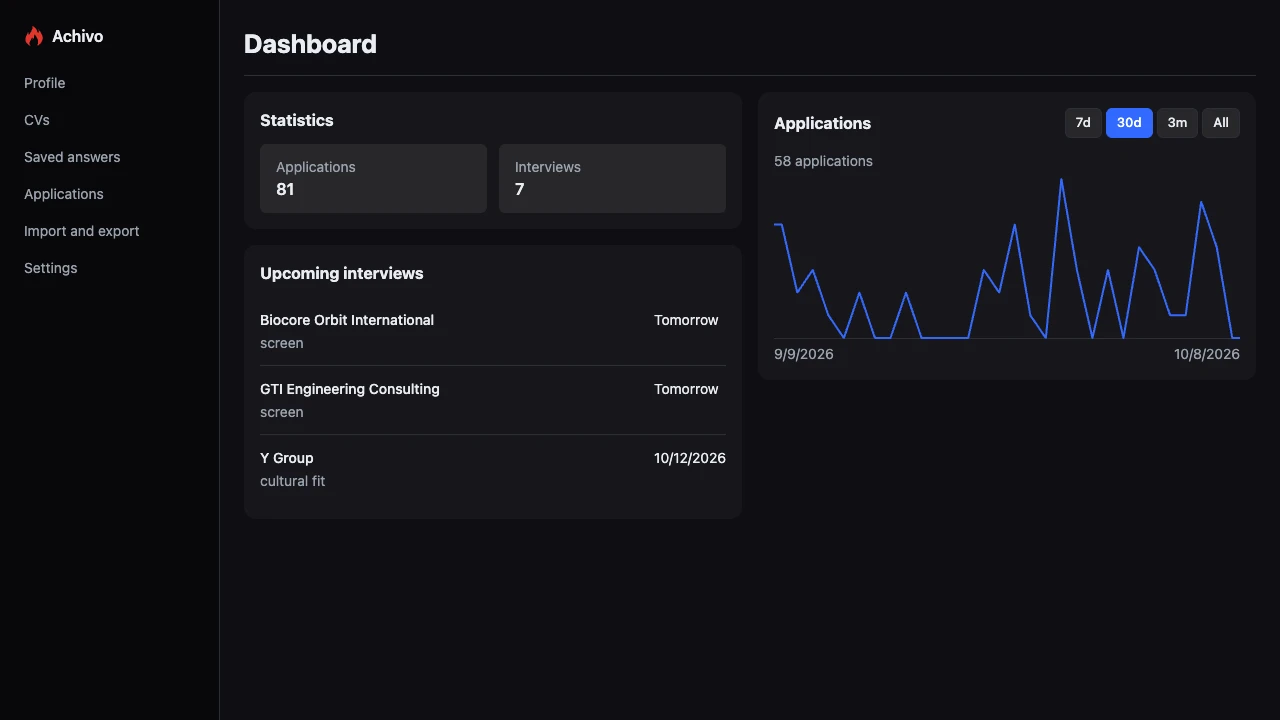
Every scheduled interview is shown on the dashboard, and each step from submission to offer is logged.
All the data stays in the browser and leaves it only to fill a form. The extension has no AI, no cookies and no hidden telemetry.
This website uses optional analytics only with consent.
Any application form. SmartRecruiters, SAP SuccessFactors, Greenhouse, Ashby, Teamtailor, Recruitee, Lever, Workday, Workable, Personio, Zoho Recruit, Haystack and LinkedIn have dedicated support. Achivo reads forms only in English, German and Dutch.
No. Achivo fills the form; the review and the submission stay manual. When it isn’t sure what a field asks, it leaves the field blank.
In the browser. The profile, CVs and answers leave it only to fill a form. The extension has no AI, no cookies and no hidden telemetry, and it never saves passwords or bank card numbers.
The browser deletes it together with the extension. Achivo keeps the data only in the browser and has no server, so no copy is left anywhere. A backup can be exported in the extension’s Settings, and importing it brings back the profile, CVs, saved answers and applications.
Fill the profile in the extension, or fill an application form as usual. The extension saves what is entered into the profile and the first CV.
With several CVs. A CV can be copied and tailored for each kind of role, showing the same experience from a different angle, and Achivo generates a PDF of each. The CV for an application is chosen right before the fill.
Achivo answers questions about places with what it knows about each place. The right to work is answered for the job’s country, taken from the job posting or the job page that opened the form. Citizenship of an EU country counts across the EU, in Iceland, Liechtenstein, Norway and Switzerland, and Nordic citizens are also covered in Greenland and the Faroe Islands; a permit for one country covers only that country. Cities are matched to their countries using the profile address and earlier applications, so a question about relocating to Munich can be answered from the relocation preference for Germany, or with a yes when the address is already there. When a place is unclear, such as a city name used in two countries, the field is left blank.
They need an answer only once, because Achivo remembers it for next time. Answer gathering can be turned off in settings.
Applications submitted on SmartRecruiters, SAP SuccessFactors, Greenhouse, Ashby, Teamtailor, Recruitee, Lever, Personio, LinkedIn and Workday are saved automatically; any other application can be added by hand. Each one keeps its timeline from the day of applying to the offer or rejection, with the job description saved alongside.
Send a report to support@achivojobs.com. It helps to describe what happened, where it happened (the page address is ideal), what was on the screen and what the expected result was.
Install the free browser extension and forget that applying for jobs is a second job.
Add to Chrome