 Achivo
How People Keep Track of Job Applications, and a Free Tracker That Does It for Them
A job search can be a long journey, especially now, at the end of 2026, when companies are laying people off under the excuse of AI. In 2021, when I was looking, I could apply to 8 jobs and get 2 offers by the end of the week. Now the ball is in the employers’ court. Many people search for months, and they apply, apply, and apply…
A hard way to keep track of job applications
At some moment there is a thought in the head: did I apply to this job already? Is it a different position from what I applied for earlier or not? How to deal with a situation when a job description disappears, and there is nothing left to prepare for the interview except for an email from the recruiter with some generic words not even naming the role by name?
And people start doing something to keep a record of every job they applied for. Some keep it simple, with a spreadsheet in Google Sheets or notes. Others use dedicated tracking apps or browser extensions.
Simple solutions have a huge downside. They all require a lot of manual work. To check whether you’ve applied, you copy the company name and search the list. You scroll through the results and hope there’s no typo, and that the company doesn’t go by a second name or a legal one. Nothing found? You apply. Then you go back to the list and paste it all in. The company, the role, the city, the salary, the benefits, maybe the whole description. At some point somewhere deep inside, a feeling appears. A feeling that you have a second job. Fill a form, search, copy, paste. Again and again.
There are also more advanced solutions such as Achivo, which is a browser extension that automatically tracks the applications you have submitted and helps to identify a position in just several clicks.
How Achivo job tracking works
At the moment when you click the submit button, the extension looks for the job description on the page. If it’s there, Achivo saves it in your browser. If not, it tries to get it from the Applicant Tracking System (ATS) directly. It fetches the public posting from the site in the background. If data is received, and many ATSs are friendly enough to share it, Achivo saves it.
Sometimes they aren’t, and the extension can’t get the data. Then you can add the description the old way, by hand or with the magic “Add this job” button in the extension menu on the posting’s page.
What Achivo saves and how it helps
Achivo saves the role, the company name, the city and the country, the link to the posting and the full description, and the date you applied. You can add some notes that you think are worth mentioning, like how to commute if they hire you, what the salary is, and how good the company is.
To make things easier, the Achivo tracker has four application statuses: applied, rejected, interview, and offer. You can see if you already applied to the company, if they rejected you, when it happened, and at what stage. If you get an offer and accept it, you can build a nice graph from your data to see how much effort you put in the job search and how it paid off.
How to check if you already applied to a company
Before applying, you can see all your applications to a company to decide if you want to apply there again. Some companies automatically reject a repeat application for the same or a similar role within a set period, often six months.
Open your applications in Achivo and type the company name in the search. You’ll see every role you applied for there, the date, and how it ended. Filter by status to see only the rejections, or only the applications still waiting for an answer.
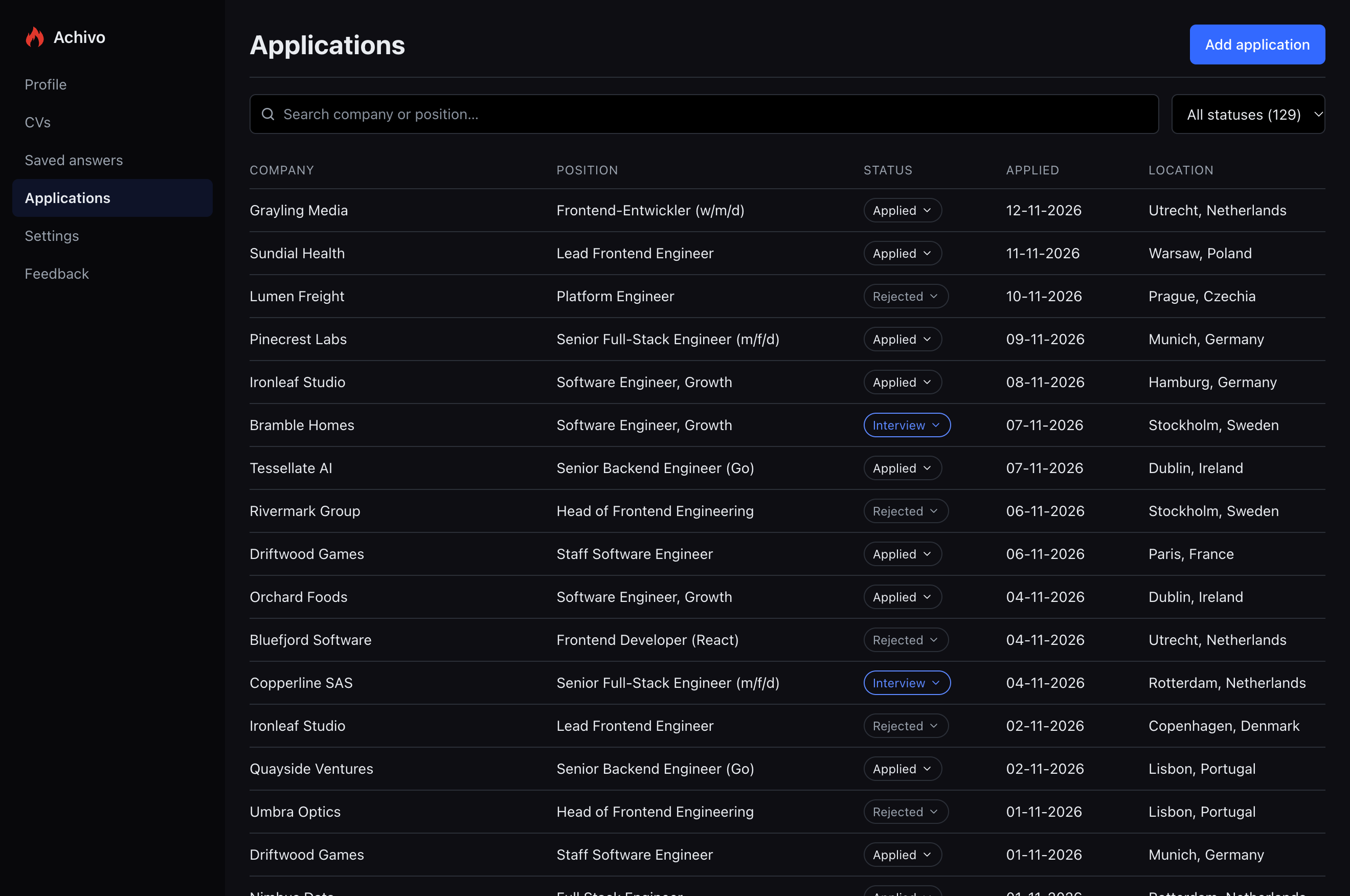
How to find an application before the interview
When a recruiter writes without naming the role, search for the company, and you’ll see what you applied for and when.
When the interview is set, add it to the application’s timeline with the date and a short note, like “Technical” or “Hiring manager”. The dashboard then shows your upcoming interviews, so you know which description to read the evening before.
Right before the interview, open the application and prepare on the crucial points of the description, even if the post was taken down long ago.
How Achivo protects your privacy
One more thing. Everything stays in your browser. The information doesn’t leave your computer, except for what goes into the forms you fill, so greedy data corporations and resume harvesters never get it. Of course, there are many other solutions on the market. Some are free and eat your data for breakfast, others charge “the price of a cup of coffee” and often take your data anyway.
If you remove the extension, its data goes with it. For that case, Achivo has convenient import and export features. All your extension data can be saved as a JSON file. You can transfer it to another browser or another Chrome profile.
How to start tracking job applications for free
The Achivo extension is free and doesn’t require an account to start. It’s really easy. Install Achivo from the Chrome Web Store in Chrome or Brave, and it’s ready! Additionally you can fill in your profile to enable the autofill function or just apply as usual, and on supported sites Achivo remembers what you entered and fills it in next time.